Spaced repetition is a scientifically proven technique that counters the forgetting curve, enabling you to retain vast amounts of information efficiently. As educators and learners increasingly face information overload, tools like flashcards powered by spaced repetition have become essential. Today, we'll explore OpenCards, a free, open-source software that transforms your Microsoft PowerPoint slides into dynamic flashcard decks—no premium apps required.
How to Convert PowerPoint Slides to Flashcards
PowerPoint presentations are goldmines of knowledge, yet details fade quickly post-lecture. OpenCards bridges this gap by turning your PPT files into interactive flashcards. Here's a step-by-step guide based on years of optimizing study workflows:
- OpenCards works seamlessly on Windows, Mac, and Linux. Download and install the latest version from its official site.
- Create your slides using any software—even free options like LibreOffice Impress—and save or export as a .PPT file.
- Structure your slides with titles as questions and body content as answers for optimal results.
- Save the presentation as a PPT file.
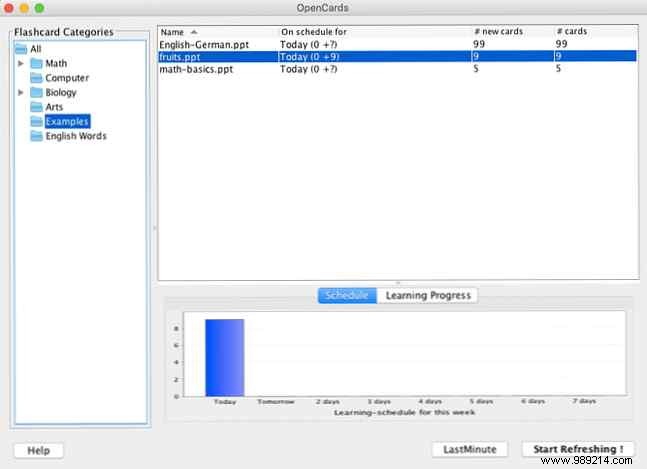
- Launch OpenCards, then import your PPT via drag-and-drop, or right-click a category and select Add card game.
- Hit Start Learning to dive into your spaced repetition session.
Key Features of OpenCards:
- Completely free, open-source, and ad-free.
- Built-in file manager to organize decks into categories.
- Intelligent spaced repetition algorithm for optimal review scheduling.
- Full support for PPT elements like tables, charts, formulas, Unicode text, images, and more.
- Two modes: long-term memorization with spaced repetition or quick cram sessions.
- Visual progress charts and schedules to track your mastery.
- Additional support for Markdown files and CSV imports.
Customize your experience through Software Preferences. While it lacks some advanced features of apps like Anki, OpenCards excels at repurposing existing PowerPoint content into powerful study tools, saving you hours of recreation.
Download: OpenCards (Free)
