WhatsApp remains one of the world's most popular messaging apps, offering cross-platform compatibility and end-to-end encryption for top-tier security. As tech expert Amit Agarwal has shared, a simple trick lets you repurpose it for sending notes, files, and more to yourself.
Unlike iMessage or similar apps, WhatsApp allows self-messaging via a solo group. Here's how: Open WhatsApp on your phone, go to the Chats tab, and tap New group in the upper right. Add any contact temporarily and hit Next.
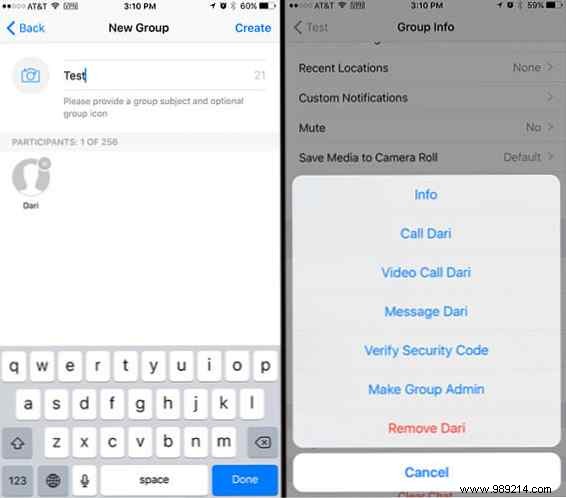
Next, name your group and tap Create. Open the group info by tapping the name at the top, scroll to participants, select the added contact, and tap Remove.
Now you have a private WhatsApp group just for you—perfect for sending files, notes, photos, links, and more.
This approach serves dual purposes: a always-accessible note-taking tool on your phone and seamless file transfer between devices.
Pair it with the WhatsApp Desktop app for Windows and Mac—available via the Microsoft Store or as WhatsApp Web—for effortless syncing. Send files, notes, photos, or voice memos from PC to phone and back. Everything stays encrypted and secure.
That said, it's not perfect. Great for quick notes and file swaps, but lacking search or organization, it's no replacement for dedicated apps.
For robust note-taking with strong organization, consider OneNote or Google Keep.
What's your go-to method for phone-to-PC file transfers? Share in the comments.
