A word count is essential for students, writers, and professionals alike—whether drafting essays, reports, or articles. As someone who's managed countless writing projects, I've relied on reliable tools to track progress accurately. Here are proven, free methods to count words across formats like Microsoft Word, PDFs, and plain text.
Microsoft Word, a staple for document creation, offers quick word count features every user should master.
The simplest way: glance at the bottom status bar showing X words. If missing, right-click the bar and check Word Count.
For more stats, click X words in the status bar or go to Review > Word Count. This dialog excludes footnotes if unchecked and updates for selections.
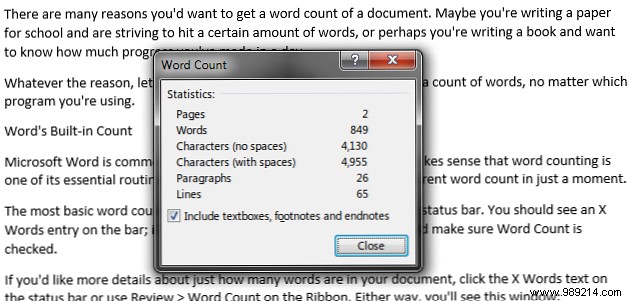
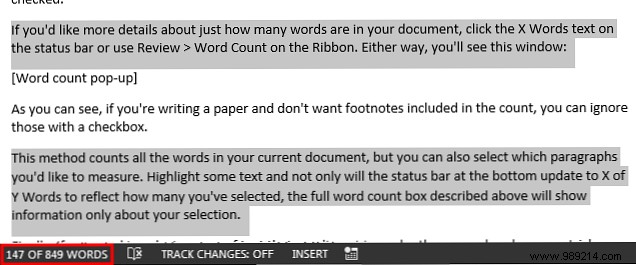
Select text for partial counts—the status bar shows X of Y words, and the dialog focuses on your highlight.
To select scattered paragraphs, use Ctrl+click (or Cmd+click on Mac) while highlighting.
For Office Online users: The status bar approximates; for full details excluding footnotes or text boxes, click Open in Word on the ribbon.
PDFs are ubiquitous, but extracting word counts requires a few steps. Here's how, based on real-world tests.
Open the PDF, press Ctrl+A to select all, Ctrl+C to copy, then Ctrl+V into Word. Use Word's tools above.
For longer files, convert using free tools. Results vary by PDF complexity but often work well.
Try Monterey Free PDF Word Count. In my tests on a 9-page PDF, it reported 5,035 words (close to Word's 5,186 and copy-paste's 5,089). Not perfect, but useful for estimates.
For web content, text files, or any non-editable format, online tools shine. Paste or upload for instant results. Note: Complex pages (ads, images) may skew counts.
Handles PDFs, Word docs, or text up to 15MB. Breaks down standard words, foreign terms, numbers, and non-standard (e.g., emails). Ideal for data-heavy docs.
Paste text for basics plus reading time, complexity level, and top 10 words. Great for writers refining readability.
Other counters offer similar features—mix and match for precision.
Word counting is straightforward with these free options, though approximations are common. They'll meet most needs reliably. What’s your go-to method? Share in the comments!
