Evernote's Web Clipper is a powerhouse for capturing and organizing web content, turning your digital notebook into a comprehensive information hub. Its Chrome extension alone is endorsed by nearly five million users.
Getting started is straightforward: simply click the elephant icon in your browser toolbar, select the content you want (like articles or research snippets), save it to a notebook, and easily search it later in Evernote. While basic use is simple, unlocking advanced features elevates your workflow. As an experienced Evernote user, I can assure you it's far from complicated.
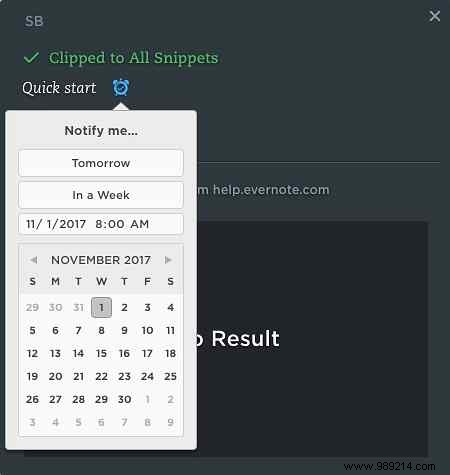
One underutilized gem is the clock icon in the Web Clipper interface.
This handy clock lets you attach notification alerts to any web clip, perfect for events, travel plans, or key details.
Pro Tip: Enhance Recall with Reminders
For vital info like new vocabulary, facts, emails, or tweets needing follow-up, clip the snippet, add notes on why it's valuable, and set a reminder via the clock. Review regularly to solidify it in your memory.
The extension works seamlessly with Google Chrome, Safari, and Opera.
Reminders cut through information overload without being intrusive, helping you review and retain key details efficiently.
How did you discover Web Clipper reminders? How do you integrate them into your Evernote routine?
