Office 365 is Microsoft's powerful subscription suite, delivering the latest desktop apps, Office Online, cloud storage, and premium mobile experiences. Tailored for business productivity and seamless collaboration, the available tools depend on your chosen plan. While you're likely familiar with staples like Word and PowerPoint, here are five standout Office 365 tools that transform team workflows—drawn from years of hands-on implementation in professional environments.
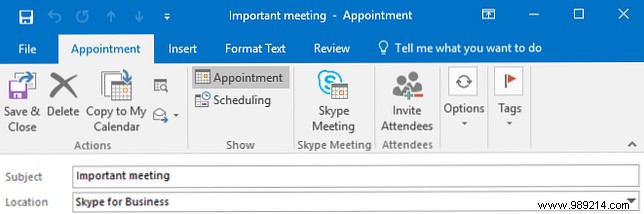
Formerly Lync, Skype for Business is Microsoft's enterprise-grade solution for messaging and meetings. It supports text, audio, and video communication, accommodating calls with up to 250 participants—inside or outside your organization.
While alternatives exist, its deep integration with Office 365 makes it indispensable. Pro tip: In Outlook, select Appointment > Skype Meeting to generate a join link instantly.
During meetings, use Present to share your desktop or PowerPoint, or the ellipsis icon > Start recording for full audio/video capture. For advanced strategies, explore our guide: 7 Skype for Business Tips and Tricks for Large Meetings—proven tactics for engaging webinars with 250 attendees using audio, visuals, and chat.
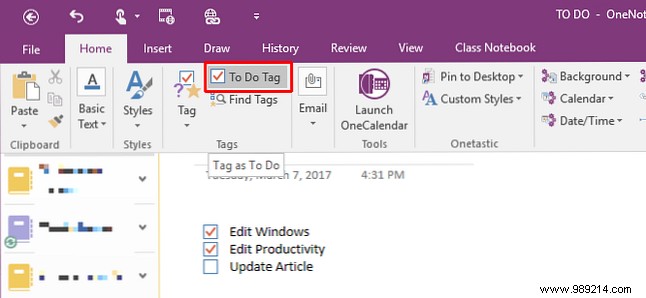
OneNote revolutionizes note-taking beyond traditional word processors. Capture handwritten notes, drawings, screenshots, audio recordings, and more in a digital notebook that syncs across devices—like a virtual filing cabinet.
We've optimized OneNote for professional use; key shortcuts include Windows Key + N for instant notes or Ctrl + 1 to convert text into checkboxes for to-do lists.
Pro tip: Leverage the Draw tab for sketches, Insert > Record Audio/Video for captures, and right-click images for Copy text from image to extract transcribed text. Dive deeper with our comprehensive OneNote guide—the definitive resource for mastering this powerhouse.
Move beyond email attachments and third-party sharing: OneDrive offers secure cloud storage akin to Dropbox or Google Drive, with anytime access from any device.
Upload files or folders via Upload > Files or Folder, or use the New dropdown for instant Word docs or Excel sheets. Track changes with right-click > Version history to restore prior versions effortlessly.
Pro tip: Share securely by right-clicking a file and selecting Share—options include anyone with the link, internal users, or specific emails, plus embeddable links for Outlook. Get started with our Quick Guide to OneDrive in Windows 10, comparing it head-to-head with competitors.
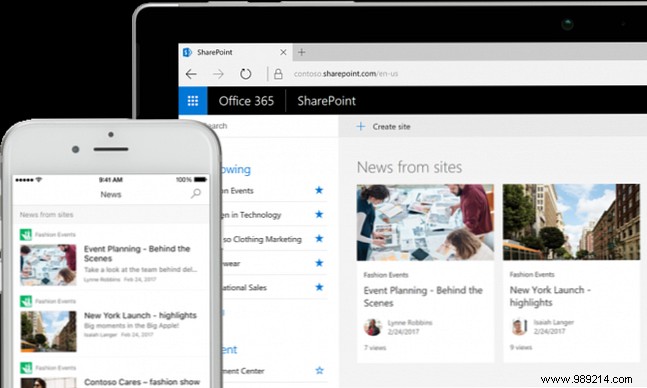
SharePoint is a robust cloud-based intranet platform for teams and enterprises. Though complex, with proper IT setup, it excels at information sharing in large organizations—hosting pages, documents, and collaborative sites.
Pro tip: Treat it as a content management system: Build team wikis, microsites with surveys and forms, file libraries, and metadata tagging. Craft a company homepage aggregating docs, news feeds, Yammer updates, videos, training materials, and mobile notifications to keep everyone aligned.
Microsoft countered Slack's rise with Teams—a chat-centric hub integrating Office 365 apps for true collaboration. Create channels for topics, enable quick chats, link conversations, and add fun with custom emojis, GIFs, and memes.
Pro tip: Seamlessly embed Word, OneNote, or Power BI; co-edit docs in-channel or use Planner for task assignment. Extend with third-party bots like Twitter feeds or Trello integrations, mirroring Slack's extensibility without leaving Teams.
Combining these tools fosters a more efficient, collaborative organization. Pair them with proven strategies from our guide: 10 Tips for Effective Real-Time Online Collaboration.
