OneNote stands out as a powerful, free note-taking app—the top alternative to Evernote. While it excels at simple text notes and media embedding, developers often face challenges with code annotation lacking proper formatting and syntax highlighting.
As experienced OneNote users and productivity experts, we've tested numerous tools to streamline workflows. That's why we recommend GitHub user elvirbrk's NoteHighlight2016, a free add-in that adds a dedicated Highlight Note tab to the OneNote ribbon for inserting beautifully formatted code blocks.
To install: Visit the release page, download NoteHighlight2016.msi under Downloads (choose the x86 version for 32-bit Windows), and run the installer. Restart OneNote to access the new tab.
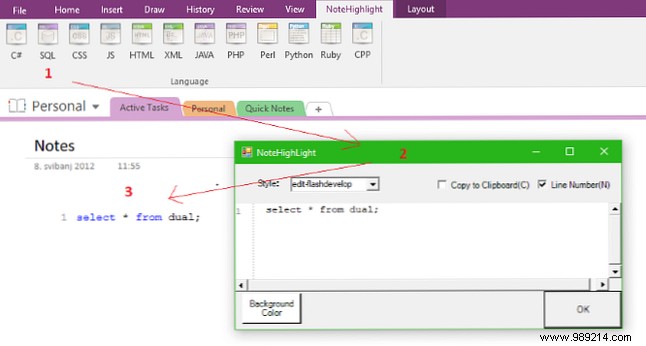
Select a programming language like C#, PHP, Java, or Python, paste your code, and click OK. Instantly, your notes feature professional syntax highlighting—far superior to screenshots or plain text dumps. This keeps notebooks organized and readable for programmers.
Discover more in our comprehensive OneNote guide packed with tips for mastering this versatile tool.
Have you tried NoteHighlight2016? Is it better than your current code-adding method? Share your thoughts in the comments!
