Family Encyclopedia >> Work

How to Sync Facebook Birthdays with Google Calendar: Never Miss One Again

As a social media veteran with years of experience managing extensive Facebook networks, I know firsthand how tough it is to track birthdays amid hundreds of friends. Experts recommend capping connections at around 150 for genuine engagement, yet remembering everyone's special day remains a challenge—until now.

Syncing Facebook birthdays to Google Calendar is a straightforward, reliable fix I've used for years. Follow these proven steps to stay on top of celebrations effortlessly.

Step-by-Step Guide to Sync Facebook Birthdays to Google Calendar

To get started:

  1. Log in to Facebook and click Events in the left sidebar.
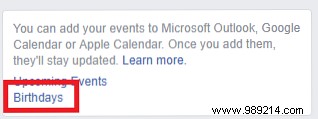
  2. Scroll down the page and find You can add your events to Microsoft Outlook, Google Calendar or Apple Calendar in the right column.
  3. Right-click Birthday and select Copy link address (don't click the link directly).
  4. Open Google Calendar.
  5. In the left panel, expand Other calendars.
  6. Click the downward arrow next to it.
  7. Select Add by URL.
  8. Paste the Facebook birthday link you copied.
  9. Click Add calendar.

How to Sync Facebook Birthdays with Google Calendar: Never Miss One Again

Your Facebook friends' birthdays now appear seamlessly in Google Calendar. Heavy event-goers can repeat for the Upcoming Events calendar too—no more missed parties!

When the day arrives, share some hilarious birthday memes to make it memorable.