Excel 2016 is a powerhouse for data analysis and visualization, yet many users miss its most efficient tools. As someone who's relied on Excel for complex projects in professional environments, I've uncovered three standout features that streamline tasks and impress colleagues. These aren't gimmicks—they're practical enhancements backed by Microsoft's updates.
Here are three Excel 2016 tricks you might have overlooked.
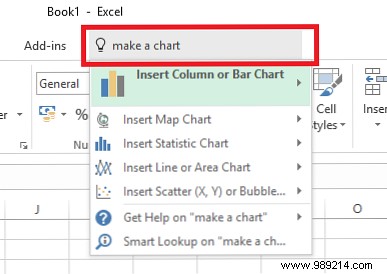
Navigating Excel's vast ribbon can be overwhelming, especially with intricate shared workbooks. The Tell Me box simplifies this: type what you need, and it surfaces commands instantly while tracking your recent searches for quick access.
Locate it at the top of the ribbon and start typing your query.
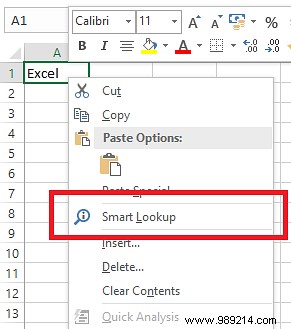
Switching between Excel and your browser disrupts focus, particularly on laptops. Instead, right-click any cell with data and select Smart Lookup. This opens Bing-powered results—including definitions and Wikipedia entries—right in the Excel pane.
Excel 2016 introduced six innovative charts for better data storytelling:
What's your favorite Excel 2016 feature? Share in the comments below.
