Excel macros can save hours by automating repetitive tasks. While recording a simple macro works for basics, it's limited and error-prone. VBA unlocks far greater power, letting you precisely control Excel's features.
As an Excel power user with years of experience automating workflows for teams, I've seen VBA transform spreadsheets from static tools into dynamic applications. If you work with Excel daily, mastering VBA is a game-changer.
We'll start with the fundamentals.
Visual Basic for Applications (VBA) is a programming language integrated into Microsoft Office apps like Excel. It's a streamlined version of Visual Basic, discontinued in 2008 but thriving in VBA form.
VBA's intuitive editor offers tooltips, autocompletion, and IntelliSense, making it accessible even for non-programmers—though it requires practice.
VBA macros offer unmatched flexibility. Instead of mimicking mouse clicks, you directly access Excel's full API for precise, repeatable results.
They're faster to create once proficient, easier to share across teams, and handle complex logic effortlessly.
Consider a spreadsheet with employee names, store numbers (column B), and quarterly sales (column C):
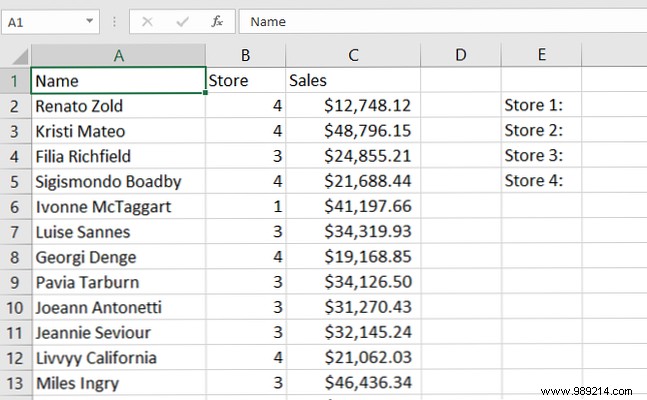
This macro sums sales by store (1-4) and outputs totals to F2:F5. Access the VBA editor via Developer tab > Visual Basic (enable Developer tab in File > Options > Customize Ribbon).
Sub StoreSales()
    Dim Sum1 As Currency
    Dim Sum2 As Currency
    Dim Sum3 As Currency
    Dim Sum4 As Currency
    For Each Cell In Range("C2:C51")
        Cell.Activate
        If IsEmpty(Cell) Then Exit For
        If ActiveCell.Offset(0, -1) = 1 Then
            Sum1 = Sum1 + Cell.Value
        ElseIf ActiveCell.Offset(0, -1) = 2 Then
            Sum2 = Sum2 + Cell.Value
        ElseIf ActiveCell.Offset(0, -1) = 3 Then
            Sum3 = Sum3 + Cell.Value
        ElseIf ActiveCell.Offset(0, -1) = 4 Then
            Sum4 = Sum4 + Cell.Value
        End If
    Next Cell
    Range("F2").Value = Sum1
    Range("F3").Value = Sum2
    Range("F4").Value = Sum3
    Range("F5").Value = Sum4
End Sub
Don't worry—it's simpler than it looks. Let's break it down.
"Sub StoreSales()" starts the macro. Subs perform actions without returning values (unlike Functions). "End Sub" closes it.
"Dim" declares variables. "Dim Sum1 As Currency" creates a Currency-type variable for monetary sums. VBA requires explicit types for efficiency—see Microsoft's VBA docs for options.
This iterates over Range("C2:C51"):
For Each Cell In Range("C2:C51")
    [code]
Next Cell
"If IsEmpty(Cell) Then Exit For" skips empty cells early. (A Do-While loop could work, but For Each suits here.) Range and Cells objects are VBA staples—master them for advanced automation.
Core logic checks the store column (Offset(0, -1) = left one column):
If ActiveCell.Offset(0, -1) = 1 Then
    Sum1 = Sum1 + Cell.Value
ElseIf ActiveCell.Offset(0, -1) = 2 Then
    Sum2 = Sum2 + Cell.Value
' ... etc.
End If
Excel evaluates top-down; first match executes. Loops + conditionals power most macros.
Assign variables to cells: Range("F2").Value = Sum1
Run via Developer > Macros > StoreSales:
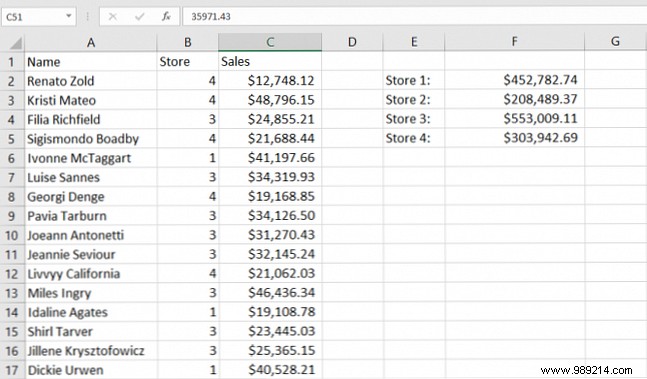
Macros start complex but clarify with practice. Develop your VBA vocabulary for rapid, powerful scripting beyond recording.
Google VBA questions, consult Microsoft VBA reference. Advance to emailing from Excel, Outlook integration, or PC info scripts. Experience shows: 10 minutes invested yields endless productivity.
