ZIP files are essential for sharing documents, photos, and more efficiently online. As a Google Workspace power user with years of experience managing cloud storage, I've relied on tools that streamline workflows without unnecessary downloads.
On desktop, apps like WinZip or 7-Zip handle unzipping effortlessly. But when your ZIP is stored in Google Drive, there's a smarter way to extract contents right in the cloud.
Picture this: A colleague emails a ZIP archive of project files, or you've uploaded a compressed folder to Drive. Traditionally, you'd download, unzip locally, then re-upload. Instead, use ZIP Extractor, a reliable Chrome extension that processes ZIPs directly in Drive.
This tool saves hours for cloud-heavy workflows by eliminating download hassles. As someone who's optimized countless Drive setups for teams, I recommend it for its simplicity and speed.
Install ZIP Extractor from the Chrome Web Store, or in Google Drive: New > More > Connect more apps, then search and add it.
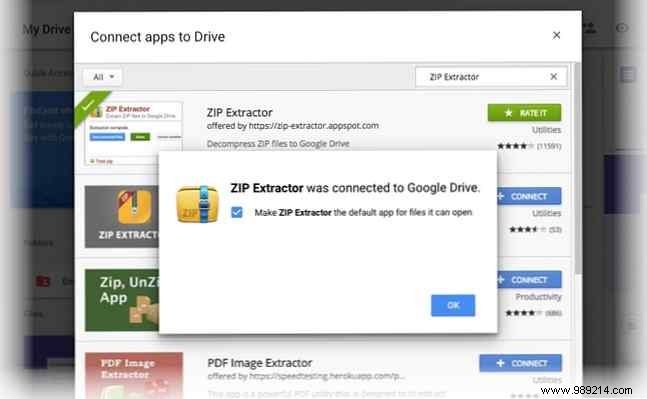
To extract: Right-click a ZIP in Drive and select Open with > ZIP Extractor. Grant access on first use – it's secure and straightforward. Then:
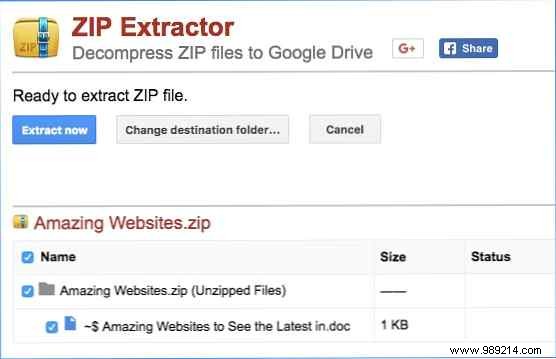
Processing happens in the cloud, so speed depends on your internet. View, share, or extract more files seamlessly from the interface.
ZIP Extractor extends Google Drive's capabilities reliably, though it lacks direct desktop download from the tool (simply share or download individually from Drive). For frequent cloud users, it's a proven time-saver.
Do you handle lots of ZIPs in Drive? Has ZIP Extractor boosted your productivity?
