Microsoft Word packs powerful hidden features that streamline your workflow, from essential keyboard shortcuts to advanced tools. Discover 60 essential Microsoft Office shortcuts or explore 10 hidden Word features to save time daily.
For instance, when you need a table fast, skip the Insert tab. Just position your cursor on a new line, type four plus signs with spaces between them (+ + + +), or use vertical bars (|) if preferred, then press Enter.
+ + + + This instantly generates a table with one row and three columns—each plus sign defines a border, spaces create cells. Need more columns? Add extra plus signs before Enter.
To adjust column widths, insert hyphens between plus signs:
+----------+----------+----------+ After creation, apply Word's formatting tools like borders, shading, or alignment for a polished look. Check our 8 formatting tips for perfect Word tables.
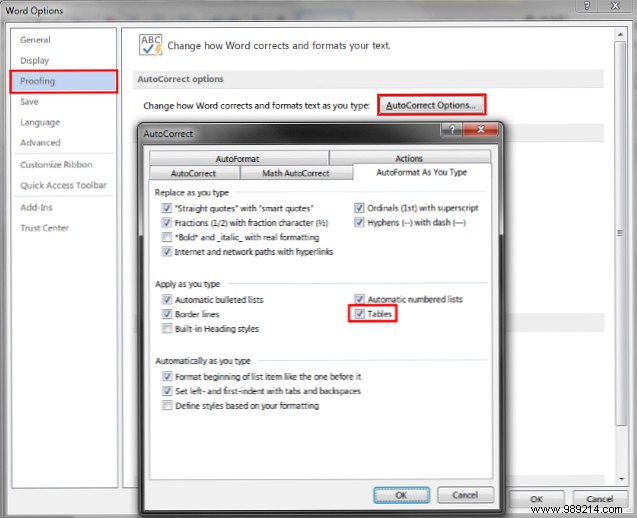
If AutoFormat doesn't trigger, enable it: Go to File > Options, select the Proofing tab (or Review in some versions), click AutoCorrect Options, switch to AutoFormat As You Type, and check Tables.
Pro tip: This method shines for quick notes or reports. Tried it? Prefer ribbon menus or shortcuts? Share in the comments!
