Family Encyclopedia >> Work

How to Set Up Out-of-Office Replies in Yahoo Mail: A Step-by-Step Guide

Planning a vacation or time away? Setting up an out-of-office reply in Yahoo Mail ensures senders know you're unavailable and when to expect a response. This simple feature prevents confusion and lets you disconnect worry-free. As email management experts with years of guiding professionals, we've streamlined the process for Yahoo Mail users.
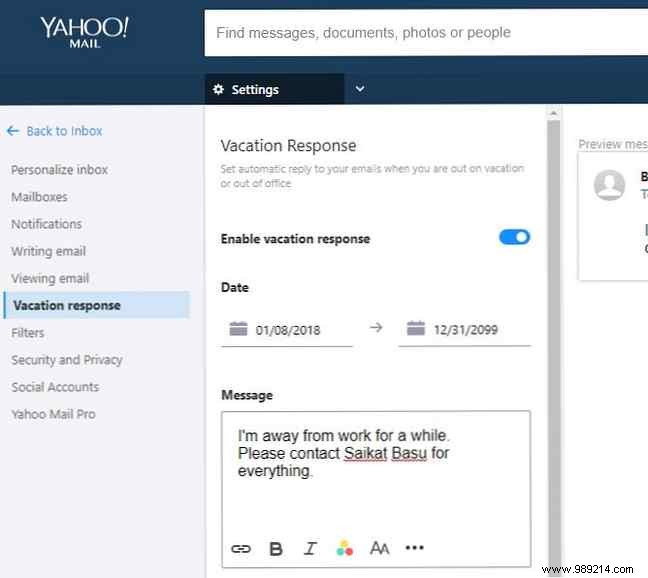
How to Set Up Out-of-Office Replies in Yahoo Mail: A Step-by-Step Guide

How to Enable Out-of-Office Responses in Yahoo Mail

  1. Log in to your Yahoo Mail account.
  2. Click the Settings gear icon in the top-right corner and select More Settings.
  3. In the left sidebar, click Vacation Response.
  4. Toggle on Enable vacation response.
  5. Set the start and end dates for your absence. Emails received during this period will trigger the auto-reply—double-check your dates for accuracy.
  6. Enter your message, such as: "I'm out of the office until [date] and will respond upon return." Keep it professional and informative.
  7. For specific contacts or domains (e.g., colleagues), add custom messages to foster better communication.
  8. Click Save to activate.

That's it! Tailor replies for internal teams versus external contacts, including backup contact info for urgent matters. This feature, battle-tested by countless professionals, keeps your inbox managed effortlessly.

Do you use out-of-office replies regularly? Share your tips or upcoming trips in the comments below!
