Microsoft Word is the gold standard for document creation and editing among professionals. If you're billing clients, managing workloads, or optimizing productivity, knowing exactly how much time you've invested in a document is essential.
Did you know Word tracks your editing time automatically? For more hidden gems, check out 10 Hidden Microsoft Word Features That'll Make Your Life Easier. This built-in tracker helps monitor work hours or analyze task efficiency.
With your document open, click the File button in the top-left corner and select the Info tab.
On the right, under the Properties header, locate Total editing time. It displays the cumulative minutes spent on the file.
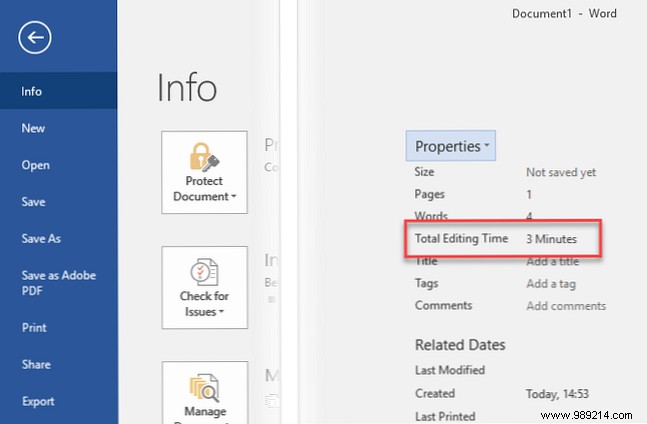
Click Properties > Advanced Properties. Switch to the Statistics tab for details like revision count, last editor, print date, and character stats.
To check without opening the file, right-click the document in File Explorer, select Properties, and go to the Details tab. Total editing time is listed there.
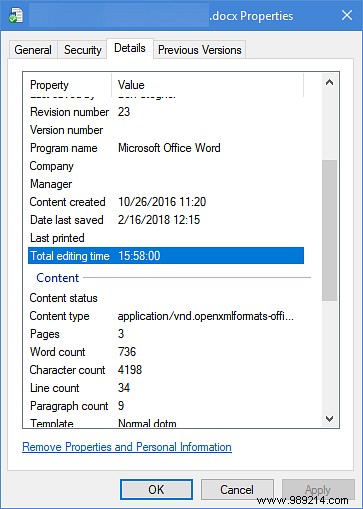
This feature offers quick insights into your efficiency or billable hours. Note: It accumulates while the document is open, including idle periods—not just active edits. For precise active tracking, consider dedicated time management software.
Ready to elevate your docs? Learn How to Create Professional Reports and Documents in Microsoft Word.
