Stuck with a DAT file that should be a Word document? Don't worry—we've helped countless users recover their files. Here's a straightforward guide based on real-world troubleshooting.
DAT files store data in text or binary formats. They're often winmail.dat attachments from Microsoft Exchange emails, but various programs generate them too. Without clues from the filename, they could hold text, images, videos, or other content. Windows might not know how to handle them either.
Opening a DAT file depends on its origin, especially if it's meant to be a Word doc. Try these reliable methods:
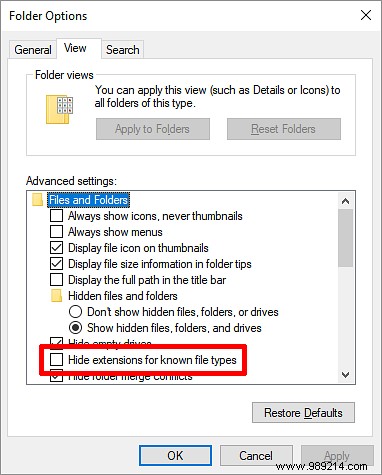
To view extensions in Windows, open File Explorer, go to the View tab, click Options, switch to the View tab, and uncheck Hide extensions for known file types.
Right-click the DAT file, rename it to .doc, and open with Microsoft Word.
Right-click the file, select Open with, and choose Microsoft Word, Notepad, or another suspect app. Click More apps for additional options.
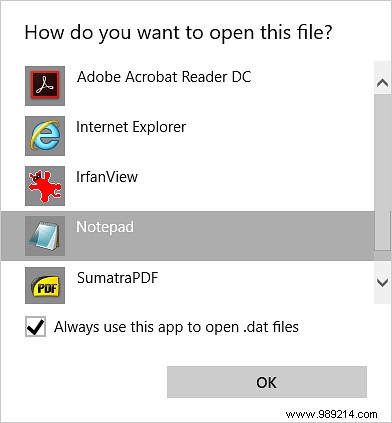
Avoid checking Always use this app unless you're sure. If it opens as gibberish, it reveals clues—like video headers in Notepad—guiding you to the right program.
Once opened successfully, conversion is simple.
If renaming to .doc worked and it displays correctly in Word, just save as .doc or .docx. You're done—no extra tools needed.
If it's a winmail.dat or ATT0001.dat from Outlook/Exchange and other methods fail, head to Winmaildat.com (free, 10MB limit).
From the Home tab, click Choose file, select your DAT (or paste URL), then hit Start.
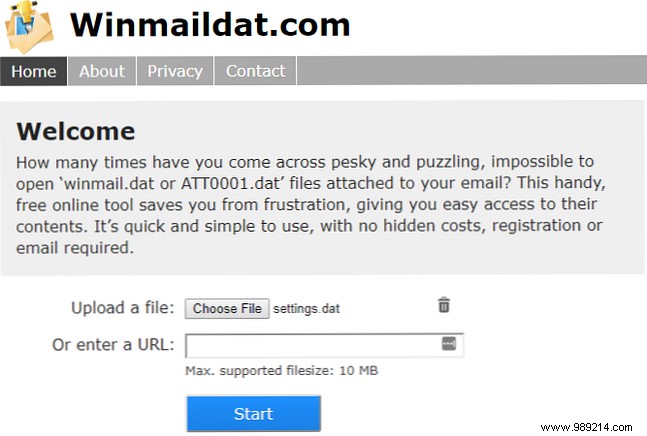
The tool identifies the original format and extracts files, telling you the best opener.
Success hinges on identifying the source. Once known, recovery is straightforward. Share your experience in comments—where'd your DAT come from?
